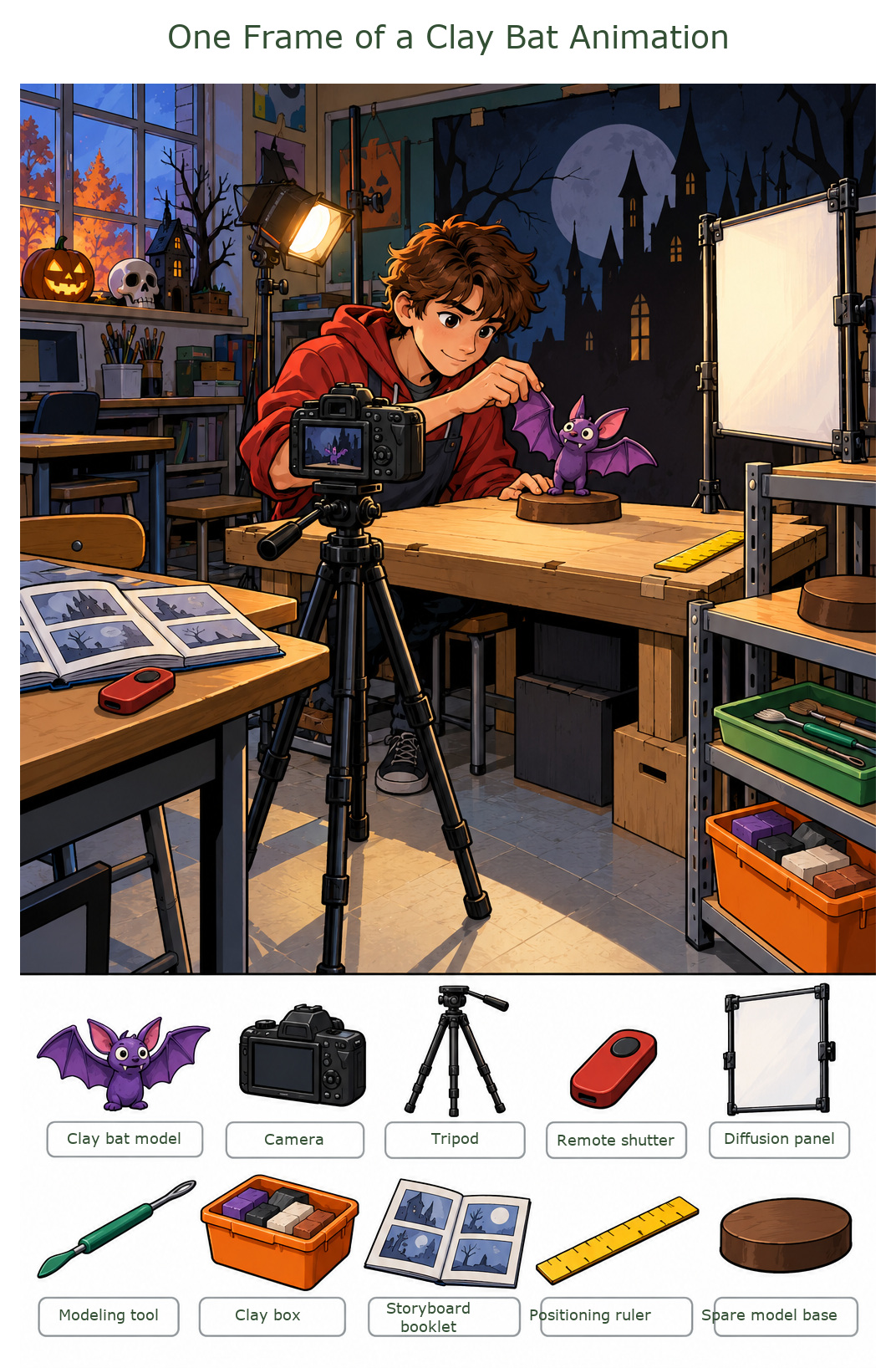
Use this printable hidden picture for a Halloween search-and-find activity for children ages 10–12. Find 10 hidden objects, including Clay bat model, Camera and Tripod. Difficulty: hard (L3). Includes Color / Line art / Answer key. Use Line art for coloring. Check your finds with the Answer key. Browser printing can also save as PDF. Scene: One Frame of a Clay Bat Animation.
In a Halloween media classroom, a student gently raises one wing of a clay bat for the next animation frame. A camera stands on a tripod in front.
3-page print layout: 1. Color · 2. Line art · 3. Answer key. Choose Print, then your printer or Save as PDF. Choose page 2 to print just the line art. Free for personal and classroom use. No sign-up needed.
In a Halloween media classroom, a student gently raises one wing of a clay bat for the next animation frame. A camera stands on a tripod in front. The left control table holds a remote shutter and storyboard booklet. A diffusion panel stands beside the right materials rack, which holds a modeling tool, clay box and spare base; a positioning ruler rests along the stage edge.
Objects to find: Clay bat model, Camera, Tripod, Remote shutter, Diffusion panel, Modeling tool, Clay box, Storyboard booklet, Positioning ruler, Spare model base.
Make it your own
Search on your own, compare discoveries with a partner, or color the line art after finding the objects. Keep the Answer key separate until you are ready to check.
Read the 10 object names together before searching. Say each word, look at its shape, and then find the matching object in the scene.
Object words and observation prompts for this puzzle
Word
Meaning or search cue
Say it
Clay bat model
Find the object named Clay bat model. Compare its outline and small details with the matching shape in the scene.
Say Clay bat model aloud. Can you describe its shape without pointing to it?
Camera
Find the object named Camera. Compare its outline and small details with the matching shape in the scene.
Say Camera aloud. Can you describe its shape without pointing to it?
Tripod
Find the object named Tripod. Compare its outline and small details with the matching shape in the scene.
Say Tripod aloud. Can you describe its shape without pointing to it?
Remote shutter
Find the object named Remote shutter. Compare its outline and small details with the matching shape in the scene.
Say Remote shutter aloud. Can you describe its shape without pointing to it?
Diffusion panel
Find the object named Diffusion panel. Compare its outline and small details with the matching shape in the scene.
Say Diffusion panel aloud. Can you describe its shape without pointing to it?
Modeling tool
Find the object named Modeling tool. Compare its outline and small details with the matching shape in the scene.
Say Modeling tool aloud. Can you describe its shape without pointing to it?
Clay box
Find the object named Clay box. Compare its outline and small details with the matching shape in the scene.
Say Clay box aloud. Can you describe its shape without pointing to it?
Storyboard booklet
Find the object named Storyboard booklet. Compare its outline and small details with the matching shape in the scene.
Say Storyboard booklet aloud. Can you describe its shape without pointing to it?
Positioning ruler
Find the object named Positioning ruler. Compare its outline and small details with the matching shape in the scene.
Say Positioning ruler aloud. Can you describe its shape without pointing to it?
Spare model base
Find the object named Spare model base. Compare its outline and small details with the matching shape in the scene.
Say Spare model base aloud. Can you describe its shape without pointing to it?
Write a short list of the object names, or describe one find while a partner guesses the word. Then return to the picture and look for the next object. See the how-to-play guide for more ways to use the pages.
Printing tips for this puzzle
What is in the three pages?
Page 1 is Color for a picture search, page 2 is Line art for finding and coloring, and page 3 is the Answer key. Switching the preview above does not change this three-page print layout.
Paper size and fit
The print layout uses Letter paper (8.5 × 11 inches) with space around the artwork. For A4, choose Fit to page and check the print preview so every border stays visible. Turn off browser headers and footers to avoid extra dates and URLs.
Print only the page you need
Choose page 2 in the print dialog to print just the Line art. Use it as a coloring sheet or an ink-friendly search page. Choose page 1 for Color, or page 3 for a separate Answer key.
Keep the answer separate
Leave the Answer key on screen until you finish, or print page 3 separately. For a group activity, use individual search pages so everyone can mark their own discoveries at their own pace.
Save a copy from your browser
After the three images finish loading, choose Print and select your printer or Save as PDF. Check the selected page numbers before saving. Personal, family and your own classroom or group use follow the site terms.
Questions about this puzzle
How many objects are hidden in this puzzle?
There are 10 objects to find: Clay bat model, Camera, Tripod, Remote shutter, Diffusion panel, Modeling tool, Clay box, Storyboard booklet, Positioning ruler, Spare model base. Use the separate Answer key when you are ready to check their locations.
What age is this puzzle for?
The suggested age is 10–12 years. Ages and difficulty are guides: choose a version that feels comfortable, and work together if helpful.
Can I print only the line art page?
Yes. Choose page 2 in the three-page print dialog. Line art can be used on its own for finding and coloring. Page 1 is Color and page 3 is the Answer key.
Do I need an account to print?
No sign-up is needed to print this free set. Open Print / Save as PDF, wait for the three pages to load, and choose your printer or Save as PDF.
Can I use this in a classroom or co-op?
Free puzzles and purchased sets can be printed for personal use, your family, or your own classroom or group under the site terms. Reselling, repackaging or uploading the files to another public website is not included.
Read the usage terms for classroom and group permissions, or contact us if something on this page needs attention.